Finalizing Floor Plan
Make sure the floor plan is complete and clean before exporting to include it in a DORIS research document.
Additional Resources
Document outline or content draft
Directions
In the Layers panel, click the eye icon next to 1: Original Company Floor Plan to hide the layer.
On
layer 2: Floor Plan, add Legend-H or Legend-V to an open space on the page.
Choose the orientation that best fits the white space on the page.
Open the Pages panel and delete pages 1-2, the example floor plans.
Determine what floor plan views need to be exported.
Check the document outline or content draft to determine what data you need to export. If you need more guidance, ask the writer or project lead.
All Challenge Defining documents include a floor plan with all occupancy data.
Hide/Unhide layers to display only specific space types.
Export the floor plan files
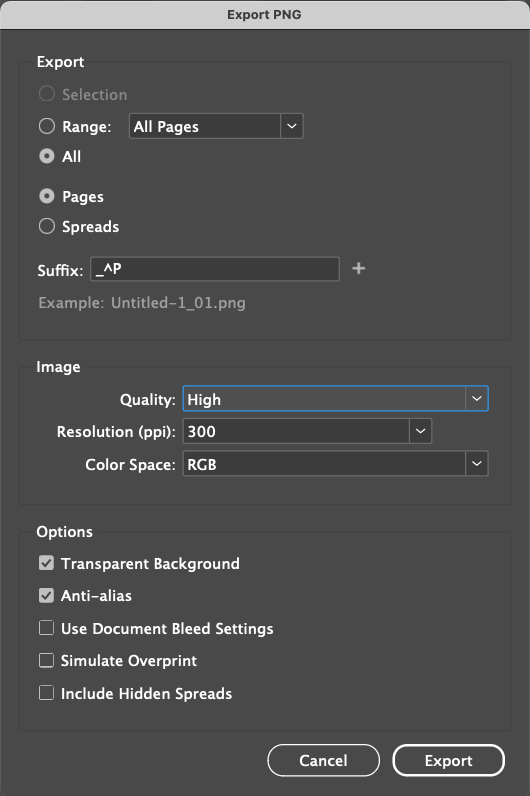
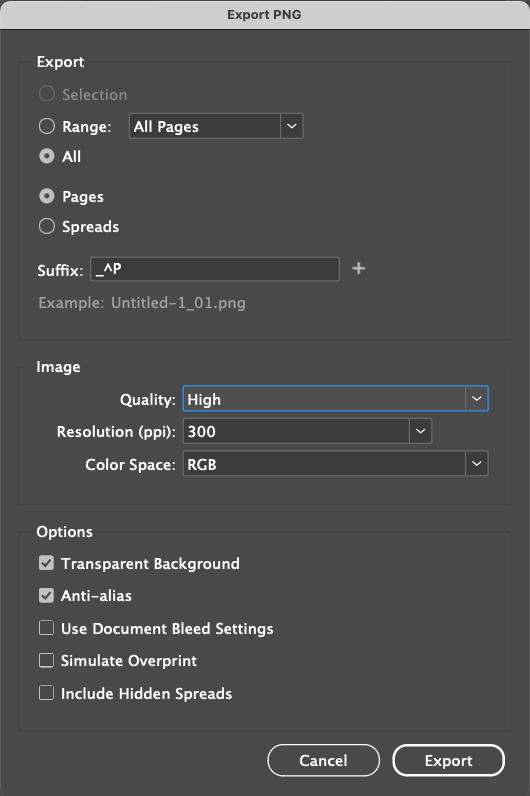
File > Export , select PNG
Save the file in Box in the project folder > phase > deliverable.
Use the following settings